Game-controller Graphics and Icons for Digital Products
When you spend years building a digital product shop, you learn to spot a usable graphic design asset within seconds. I have been selling on Etsy, Creative Fabrica, and my own Shopify store since 2019, and I have tested hundreds of SVG designs, clipart sets, and printable files before deciding whether they belong in a product listing. Recently I downloaded the Game-controller set to evaluate it for a new collection of gaming-themed merchandise I am preparing for the holiday season. Here is my honest review from the perspective of someone who needs designs that actually sell.
First Look at the Game-controller Design Set
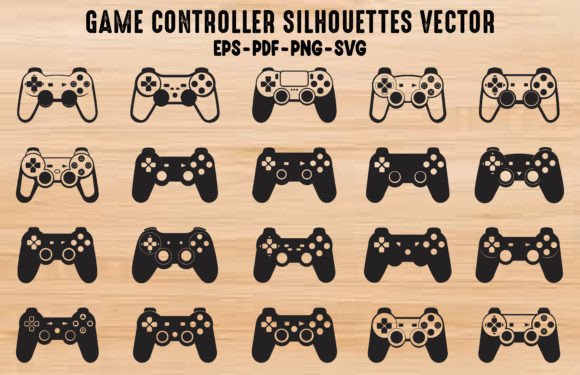
Opening the files, I immediately noticed the clean lines and balanced proportions. The controller shape is recognisable without being overly detailed, which is exactly what I look for in a commercial design. It sits comfortably in that sweet spot between playful and modern, making it suitable for a wide range of buyers. The mood is energetic but not childish, so it could appeal to teenage gamers, adult collectors, and even parents looking for birthday party decorations or personalised gifts. The visual personality feels bold yet minimal, which means it can scale down to a small sticker or scale up to a full t-shirt print without losing its impact.
The set includes three digital files delivered on a 1200 by 800 pixel canvas. You receive one Adobe Illustrator file, one SVG file, and one PNG file. The AI file gives you full control over editing paths and colours, the SVG file is ready for cutting machines and web use, and the PNG file offers a quick solution for mockups and social media graphics. This combination covers most use cases without forcing you to convert formats yourself. For a digital product creator, that kind of convenience saves time and reduces friction when testing new designs.
Testing the Game-controller Across Real Product Categories
I work with several product types every week, and I put Game-controller through those same categories to see where it performs best. For SVG designs and Cricut projects, the cutting lines are clean and the anchor points are well placed. I tested it on a simple layered vinyl decal for a laptop, and the registration stayed tight. For PNG designs and sublimation transfers, the transparency is well preserved, and the edges are crisp even when I placed it over a dark background in a mockup. The clipart itself has a solid visual hierarchy, so it works as a standalone element or as part of a larger design bundle.
I also tested it in a Canva template for a gaming channel overlay. The SVG imported cleanly, and I could recolor it to match the brand palette without any path corruption. For t-shirt designs, I placed the controller on a mockup with a sans serif type treatment, and the composition felt balanced. It also worked well as a mug design and a tote bag print, where the simple silhouette translated nicely to curved surfaces. For planner stickers and scrapbooking kits, the size is appropriate, and the design does not feel too heavy for small-scale layouts.
Product Presentation and Thumbnail Appeal
One of the most overlooked aspects of selling digital products is how a design looks in a marketplace thumbnail. I previewed Game-controller at the typical Etsy search result size, roughly 200 pixels wide, and the shape remained readable. That is a crucial test. If a design turns into a blurry blob at thumbnail size, you lose click-through potential before a buyer even reads your listing title. This controller graphic holds its form well, which gives you a better chance of standing out in a crowded category.
For product mockups, I used the PNG file to create listing images for a gaming-themed sticker pack and a controller wrap for a tumbler. The file resolution is sufficient for clean mockups without pixelation. I also experimented with a design bundle that included the controller alongside other gaming icons, and the consistent line weight helped the collection feel cohesive. When you are selling on a creative marketplace, visual consistency across a bundle builds brand identity and encourages repeat purchases.
Where the Asset Works Best
Based on my testing, Game-controller performs best in medium to large product previews and themed bundles. It works well on printable wall art for gaming rooms, greeting cards for gamers, and invitation templates for gaming parties. It also suits social media graphics and blog graphics where you need a quick visual cue for gaming-related content. The design is strong enough to carry a packaging design for small business branding, such as custom sticker sheets or eco-friendly merchandise boxes.
For sublimation designs on polyester apparel and hard goods, the PNG file with its transparent background makes placement straightforward. I tested it on a white ceramic mug and a black polyester tumbler, and the contrast held well in both cases. The design also works as a sticker design for die-cut sheets, kiss-cut rolls, and individual vinyl decals. If you sell digital downloads on platforms like Gumroad or Teachers Pay Teachers, this graphic can serve as a cover image element or a decorative border accent.
Where to Use the Design with Care
No graphic design asset is perfect for every scenario, and Game-controller has a few limitations worth noting. I would avoid using it in extremely tiny sticker details where the fine lines might become too thin for clean cutting. If you are producing a tiny charm or a micro sticker for a planner, the controller shape may lose some of its definition. Similarly, for Cricut projects that require very intricate weeding, the design is simple enough to handle well, but if you pair it with overly complex text or additional elements, the overall layout could become crowded.
On dark backgrounds, the PNG version works well, but I recommend testing the contrast before finalising a product. If you place the controller on a very dark navy or black background, a thin outline or a drop shadow in your design software can help it pop. For print-on-demand products where the print area is small, such as a pocket tee or a small zipper pouch, the controller should be scaled appropriately so it does not overwhelm the product. I also recommend checking the commercial license for whatever marketplace you are selling on, especially if you plan to include the design in a design bundle or a Canva template that you resell.
Practical Seller Notes Before You Publish
If you are preparing a listing using Game-controller, here are the steps I recommend before you hit publish. First, test the design on real mockups for at least three different product types. I used a t-shirt mockup, a mug mockup, and a sticker sheet mockup, and I adjusted the placement slightly for each one. Second, preview the design as a marketplace thumbnail at the actual size it will appear in search results. If it looks muddy at 150 pixels, consider simplifying the composition or increasing the contrast.
Third, check how the design looks on both white and dark backgrounds. I always export a version of the PNG with a transparent background and then test it over a black rectangle and a white rectangle in my design software. Fourth, verify the PNG transparency by opening the file in a browser and dragging it over a coloured background. Fifth, inspect the SVG cut quality by importing it into Cricut Design Space or Silhouette Studio and checking for stray nodes. Sixth, confirm that the file resolution matches the requirements of your print provider or your own printer. At 1200 by 800 pixels, the canvas is appropriate for most digital products, but if you are creating a large poster, you may need to scale it up with vector software.
Seventh, organise your files clearly for customers. I rename the AI file, the SVG file, and the PNG file with descriptive names and include a short readme text file that explains the formats and the canvas size. This small step reduces support messages and increases customer trust. Eighth, consider pairing the controller with a serif font for a more premium feel, a sans serif font for a modern look, a script font for a playful touch, a handwritten font for a casual vibe, or a display font for bold titles. The right font pairing can elevate a simple icon into a complete product.
Finally, confirm the commercial license before selling finished products. If you downloaded the set from a marketplace that offers a standard commercial license, make sure you are allowed to sell physical and digital products that incorporate the design. Some licenses restrict the number of sales or the type of products you can create. When in doubt, contact the seller or read the license terms carefully. I have seen too many shop owners receive a takedown notice because they assumed a license covered something it did not.
How Game-controller Supports a Professional Product Collection
Building a small business branding around gaming-themed products requires cohesive design assets. Game-controller fits naturally into a larger collection of graphics and icons that you can develop over time. I plan to use it as the anchor element in a gaming bundle that includes a controller, a joystick, a headset, and a keyboard. The consistent line style across these design assets will help my handmade business look more professional and intentional.
For printable design sellers, this controller graphic can appear on multiple product types without feeling repetitive. You can sell it as a standalone SVG design, include it in a clipart pack, use it in a sublimation design bundle, or feature it in a Canva template for social media. The versatility reduces the time you spend sourcing new assets for each new product launch. Instead, you can build a library of proven graphics that you know will sell across different categories.
When I look at the Game-controller set, I see a graphic that understands its purpose. It is not trying to be the most detailed controller illustration ever drawn. It is trying to be useful for sellers who need a reliable, clean vector that works in multiple contexts. That is exactly the kind of graphic design asset I trust for my own product listings. If you are a digital product creator looking for a controller icon that will save you time on editing and testing, this set is worth adding to your design assets folder.